
On October 26, 2026, Apple released macOS Golden Gate 27.2, part of a wave of updates that fixes 286 security flaws, 263 of them on the Mac. If you have a Mac with an M chip, even a 2020 M1, its security depends on installing this update.
You'll know whether this update is for your Mac, how to install it safely, and how to tell it apart from a fake prompt.
286 doors slammed shut
Apple fixed 286 security flaws in its latest wave of updates for iPhone and Mac. Back in 2020, Apple introduced the M1, its first in-house chip for the Mac. It was faster than the Intel models and easier on the battery. Today, that Mac is still fast, but speed doesn't keep it safe. Its security depends on something else: keeping it up to date. The chip does its job. The rest is up to you.

The chip is the engine, not the lock
Think of your Mac as a house. The chip is the engine. The operating system, macOS, is the doors and the locks. A powerful engine doesn't lock a single door, no matter how fast it is. That's why it matters where the flaws Apple fixed actually were. They weren't in the chip. They were in Bluetooth, in the browser, in app permissions, and in other parts of the system. In other words, in the locks you use every day.

The alert you shouldn't put off
On October 26, 2026, Apple released macOS Golden Gate 27.2 for Macs with Apple's own chips, starting with the M1. Plenty of people see it as just another pop-up and put it off until tomorrow. But under the hood, it changes parts you use every day: the Bluetooth for your headphones, the engine Safari uses to load web pages, and the gatekeeper that checks the apps you install. The fix is ready, but it doesn't reach your Mac until you hit install. Until then, your doors stay just as they were.

Six years from chip to fix
The M1 came out in 2020. The fix arrived on October 26, 2026, six years later, and it still covers those first Macs with Apple's own chip. The next day, the tech security outlet SecurityWeek tallied the flaws fixed in this wave of iPhone and Mac updates. It also reported that Apple brought a fix to iPhones still running iOS 18, in version 18.7.11. So the fix also reaches phones that aren't on the newest version.

If your Mac has an M chip, this is for you
Apple says macOS 27 runs on any Mac with its own chip. Its list includes MacBook Air and MacBook Pro from 2020 on, Mac mini from 2020 on, iMac from 2021 on, Mac Studio from 2022 on, and Mac Pro with Apple silicon from 2023 on. If your Mac runs on Intel, this isn't your update. And if you only use an iPhone, this Mac update isn't for you either: your part is keeping your phone updated.

Almost all the flaws were on the Mac
Of those 286 flaws, 263 were on the Mac, according to SecurityWeek's summary. That's nearly all of them. This time, the Mac wasn't the quiet cousin of the family. The fixes cover Bluetooth, WebKit (the engine Safari uses to display web pages), permissions and privacy, the safeguards that check and isolate apps, and other parts of the system. These are pieces that work in the background every time you use your computer.

How to spot the real update
Watch out for this one. The real update comes from System Settings, right inside your own Mac. If a website pops up while you're browsing and offers you a button to update your Mac, ignore it and close the page. The rule is simple and always holds: system updates get installed from your computer's settings, not from a site that opens in your browser or a button someone puts in front of you.

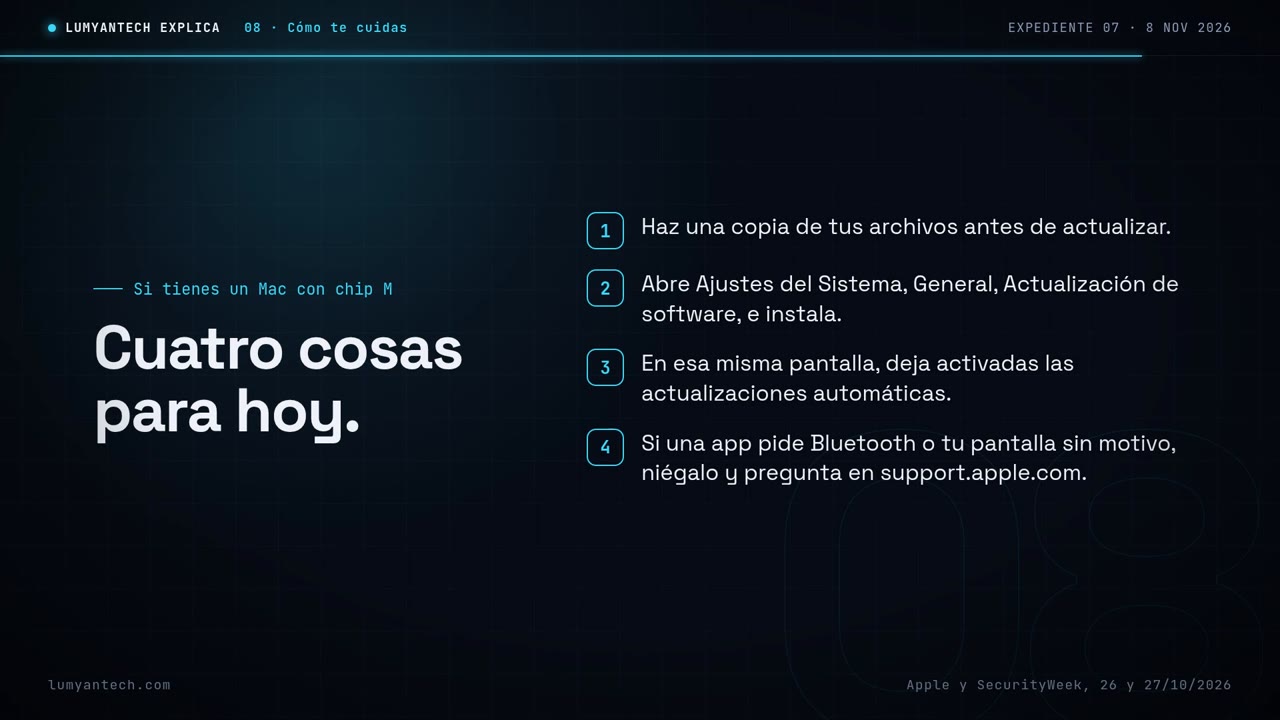
Four things to do today
If you have a Mac with an M chip, here are four things you can do today.
A fast Mac isn't the same as a protected Mac: what protects it is the update you install.
Sources
- support.apple.com · support.apple.com
- securityweek.com · securityweek.com
- support.apple.com · support.apple.com
- support.apple.com · support.apple.com
Verified on November 11, 2026
Would you rather we handle it? Book a call